Selective Disclosure for MCP

MCP-SD: Selective Disclosure for Tool Calls

MCP-SD is a protocol pattern that lets an agent select which attributes of a tool result enter the LLM — the rest stays out. S2SP is its reference implementation, adding a Direct Data Interface (DDI) so the withheld body flows server-to-server in async mode or through the agent SDK out-of-band in sync mode.

Get Started Read the Spec
Agent control plane Resource Server caches body Consumer Server merges + processes abstract abstract + resource_url DDI — data plane POST /s2sp/data/{token}
83–93%
Token savings (fewer abstract cols = more savings)
7ms
Data-plane fetch (localhost)
MCP
No MCP spec changes required

MCP-SD and S2SP

Two features of the protocol: one for what the LLM sees, one for where the rest goes.

MCP-SD

Selective Disclosure for MCP

  • Any MCP tool returning tabular data can expose an abstract_domains parameter.
  • The agent names the columns it needs; the remainder is withheld from the LLM within the same call.
  • Shrinks per-turn LLM context by disclosing only the attributes the agent declares.
  • Operates at the control plane, independent of how the withheld body is delivered.

S2SP

Server-to-Server Protocol with a Direct Data Interface

  • Operates at the data plane — delivers withheld columns via a dedicated DDI (Direct Data Interface).
  • Body cached behind a presigned URL (256-bit token, single-use, 10-min TTL).
  • Two modes: async (direct server-to-server) and sync (through the agent's DDI out-of-band).
  • Reference Python SDK: mcp_sd, with server decorators, data-plane helpers, and agent adapters.
vs Without MCP-SD Weather Server Agent LLM Stats Server All 30 columns flow through agent 6,537 tokens in measured demo With MCP-SD (S2SP) Agent LLM Weather Server Stats Server abstract domains only abstract + resource_url DDI POST /s2sp/data/{token} Body flows server-to-server over the DDI (data plane) Agent sees 469 tokens with 2 columns | Body stays out of LLM

Two Transfer Modes

S2SP supports two data-plane strategies. Both keep body data out of the LLM context — they differ in where the body lives in transit.

Default

Async Mode

Body cached on the resource server. The consumer pulls it over the DDI (Direct Data Interface) — a dedicated server-to-server HTTP channel. The agent process never touches the body.

Agent LLM (abstract only) Resource Server caches body Consumer Server merges + processes abstract + resource_url abstract + resource_url DDI POST /s2sp/data/{token} DDI — direct server-to-server, bypasses agent entirely
  • Body location: cached on resource server
  • DDI path: direct HTTP, server → server
  • Agent process sees body: no
  • Best for: large payloads, multi-hop pipelines, when servers can reach each other
Fallback

Sync Mode

The agent process uses an SDK layer: the LLM sees the abstract only, while the DDI buffer carries the body out-of-band. Abstract and body stay separate before the consumer call.

Agent Process LLM CONTEXT LLM abstract only SDK BUFFER DDI Direct Data Interface Resource Server returns inline Consumer Server merges + processes abstract body inline abstract body (via DDI) data plane — body transits the SDK buffer, not the LLM context
  • Abstract path: resource → LLM context → consumer arguments
  • Body path: resource → SDK buffer → consumer arguments
  • LLM sees body: no, when the agent uses the S2SP dispatcher correctly
  • Best for: firewalled servers, single-hop workflows, local dev
Key invariant
In both modes the LLM context sees only the abstract columns the agent selected — token savings are identical.
What differs
Where the DDI runs: directly between servers (async) or through the agent process (sync). Either way, it skips the LLM.
Pick sync when
The consumer can't reach the resource server over HTTP (NAT, firewall, mTLS boundary).

MCP-SD vs. Progressive Disclosure

Several recent designs apply progressive disclosure to MCP. MCP-SD addresses a different axis — selective disclosure — and composes with the others instead of competing with them.

Progressive Disclosure
Time-axis staging: reveal a summary first, then more detail on demand. The agent pays one extra inference round-trip to unlock deeper layers. Used by Claude Skills and the MCP Progressive Disclosure extension.
Selective Disclosure
Dimension-axis picking: the agent names exactly which attributes it wants to see and hides the rest. No extra round-trip — selection happens in the same call, so the agent never has to spend an inference unlocking more detail.
MCP-SD = Selective Disclosure (control plane)
S2SP = MCP-SD + Server-to-Server Data Plane via DDI

Where each design operates in the MCP pipe

Scheme Disclosure type What's disclosed When LLM sees it Extra round-trips
Claude Skills Progressive Skill content (SKILL.md + scripts) After model names the skill +1 per first use
MCP Progressive Disclosure Progressive Full tool schema / inputSchema After resources/read fetch +1 per tool first use
MCP-SD
(impl: S2SP)
Selective + data-plane delegation Selected columns in LLM; body stays out Same call; body stays out of LLM when S2SP routing is used 0
What makes MCP-SD different

Why does S2SP matter?

Current MCP workflows often route full tool results through the agent. S2SP offers a selective-disclosure path for tabular results.

$

Eliminate Token Waste

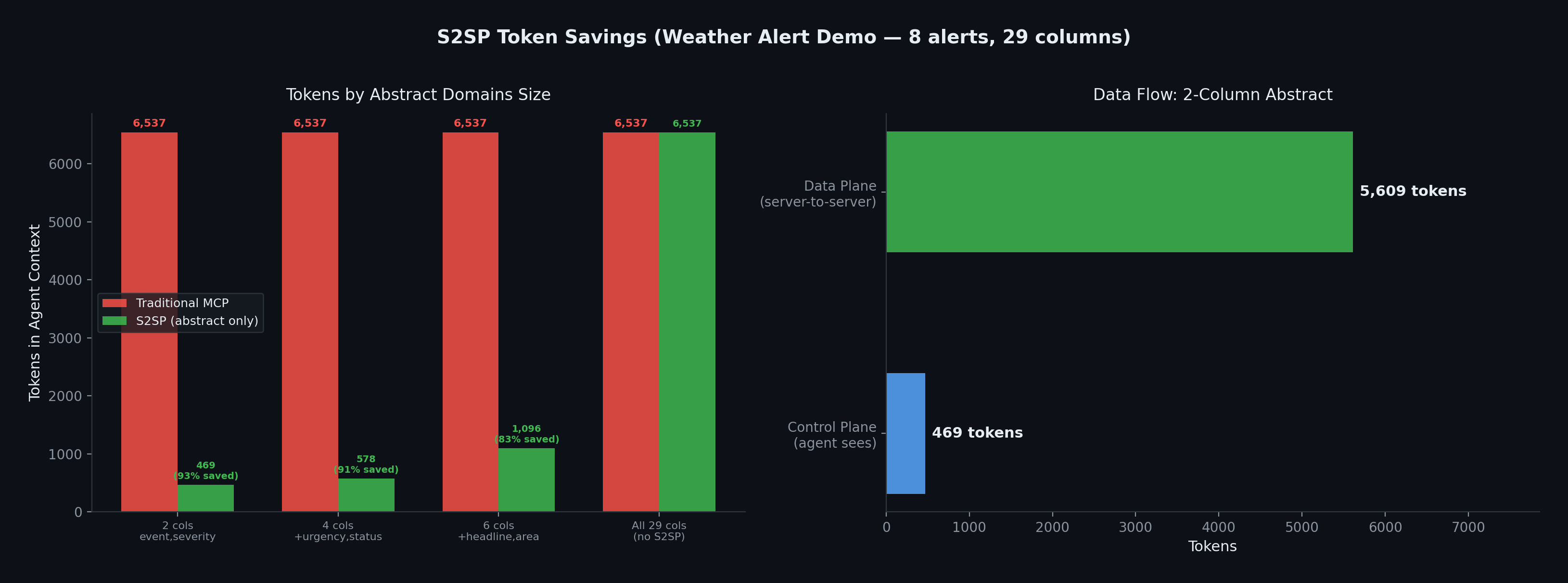
In the weather-alert demo, a 2-column abstract used 469 tokens instead of 6,537 for the full 29-column result. Actual savings depend on row count, column count, and selected abstract fields.

Measured Local Fetch

The demo's data-plane fetch completed in 7ms on localhost. Remote latency depends on the network path between the MCP servers.

🔒

Agent Stays in Control

The agent initiates and orchestrates all transfers. No data moves without agent authorization. The agent controls which servers receive each resource_url.

🔧

Small Dependency Set

The SDK uses FastMCP plus common Python HTTP components: Starlette, uvicorn, httpx, pydantic, and anyio.

🛡

Capability URLs

256-bit presigned URLs are single-use and use a 10-minute TTL by default. Production deployments should use TLS and appropriate server access controls.

MCP-Compatible Path

S2SP uses standard MCP tools and JSON arguments. Traditional agents can call resource tools without abstract_domains and receive normal full results.
What can S2SP enable?

📊

Database → Analytics Pipelines

Route wide tabular query results from a database server to an analytics server. The agent can inspect selected columns, then let the consumer fetch the full selected rows.

📄

Structured API Pipelines

Route CRM records, search results, alerts, or telemetry rows where the agent only needs a few fields to decide which rows a downstream tool should process.

👥

Cross-Service Data Sync

Sync customer records from a CRM server to an email marketing server. Agent orchestrates the filter and sync; data moves directly between services.

Token Savings

Measured on 8 NWS weather alerts (29 columns each). The agent picks which columns it needs — the rest go server-to-server.

Token Savings Comparison

Data-plane fetch latency (7ms) measured on localhost. For remote deployments, latency depends on network distance between the two MCP servers, not the protocol overhead is the HTTP request plus JSON filtering and serialization.

Quick Start

Minimal resource and consumer server setup.

$ pip install mcp-sd

Resource Server (exposes an S2SP tool)

from mcp_sd import S2SPServer

server = S2SPServer("weather-server")

@server.sd_resource_tool()
async def get_alerts(area: str) -> list[dict]:
    return await fetch_from_nws(area)

Agent Orchestration (control plane + data plane)

# 1. Control plane: agent gets only selected fields + _row_id
result = get_alerts(area="CA", abstract_domains="event,severity,headline")
# result.abstract = [{_row_id: 0, event: "Wind Advisory", ...}, ...]
# result.resource_url = "http://..."

# 2. Agent filters on abstract, picks rows it cares about
selected = [row for row in result.abstract if "Wind" in row["event"]]

# 3. Pass abstract rows to consumer — it fetches body from data plane
draw_chart(abstract_data=json.dumps(selected),
           resource_url="http://...")

Start Building